In my opinion, this is the biggest single release in MadExcept history! Basically everything I've ever wanted added to MadExcept, is now in MadExcept. Go check it out here, download "madCollection" to install. Don't forget to click the "MadExcept 4" button when installing, or you won't actually get MadExcept installed.
Thursday, May 24, 2012
MadExcept 4.0 is here!
MadExcept 4 is out! It's my favorite exception-catching email-sending bug-squashing tool for Delphi. Now with the following new features:
64 bit Windows support for Delphi XE2
Full unicode support
SSL and TLS SMTP client mailing
SSL HTTP uploads
Bug Tracker integration: added FogBugz, BugZilla and Mantis reporting
option to conform to Windows Logo requirements
extensive memory and resource leak reporting
added debug memory manager
added support for nested exceptions
added new "madExceptViewer" tool
lots of smaller improvements
In my opinion, this is the biggest single release in MadExcept history! Basically everything I've ever wanted added to MadExcept, is now in MadExcept. Go check it out here, download "madCollection" to install. Don't forget to click the "MadExcept 4" button when installing, or you won't actually get MadExcept installed.
In my opinion, this is the biggest single release in MadExcept history! Basically everything I've ever wanted added to MadExcept, is now in MadExcept. Go check it out here, download "madCollection" to install. Don't forget to click the "MadExcept 4" button when installing, or you won't actually get MadExcept installed.

Sunday, May 20, 2012
Hotfix for for Firemonkey in Delphi/C++Builder/RAD update4
Embarcadero CodeCentral has now made available the awaited hotfix for Update#4, which solves the "blurry font" issue in Firemonkey, and other issues.
It's available here: CodeCentral 28881
A side note is that you have to scroll past 150 lines of "Products" that you must own one of, in order to read what is in it. You thought there were a lot of Editions of Windows 7? That's nothing, I believe that Delphi/RAD/C++Builder has them beat. I've done a quick breakdown and here are the numbers:
There are 8 editions of AllAccess that contain RAD/Delphi/C++, which is Embarcadero's way of bundling both Database and Developer applications. So your license-key would be an all-access license key, of a particular level (named by metals like silver, gold, etc)
There are 5 SKU levels of the primary products, and two products (Delphi and C++ Builder) and then a third product name (RAD Studio) that indicates the bundle of Delphi plus C++ Builder, and when you expand these out, you end up with 142 different "products" that you could have purchased. Some are multi-license packs, some are upgrade editions, and some are special pricing levels like Academic pricing.
At some point, if it was my job, I'd keep that list to myself (150 editions in total), and simply replace all the editions in CodeCentral's "customer-facing" document to "You must own an edition of Delphi, or C++ Builder XE2 to download this file".
I thought about this, as I scrolled down through three-screens full of editions of RAD Studio. It would amuse me if some of those editions represent combinations that zero customers have actually purchased (The 5 pack of Academic upgrades from Professional to Ultimate, for instance.)
Just because I'm in the mood, I'm posting the full list here:
It's available here: CodeCentral 28881
A side note is that you have to scroll past 150 lines of "Products" that you must own one of, in order to read what is in it. You thought there were a lot of Editions of Windows 7? That's nothing, I believe that Delphi/RAD/C++Builder has them beat. I've done a quick breakdown and here are the numbers:
All-Access Bronze
All-Access Gold
All-Access Platinum
All-Access Silver
All-Access XE Bronze
All-Access XE Gold
All-Access XE Platinum
All-Access XE Silver
C++Builder XE2 Architect
C++Builder XE2 Architect - Network License
C++Builder XE2 Architect 10 pack
C++Builder XE2 Architect 10 pack Upgrade
C++Builder XE2 Architect 5 pack
C++Builder XE2 Architect 5 pack Upgrade
C++Builder XE2 Architect Academic
C++Builder XE2 Architect Academic - Network License
C++Builder XE2 Architect DevRel
C++Builder XE2 Architect Upgrade
C++Builder XE2 Architect Upgrade - Network License
C++Builder XE2 Architect Upgrade from Starter
C++Builder XE2 Enterprise
C++Builder XE2 Enterprise - Network License
C++Builder XE2 Enterprise 10 pack
C++Builder XE2 Enterprise 10 pack Upgrade
C++Builder XE2 Enterprise 5 pack
C++Builder XE2 Enterprise 5 pack Upgrade
C++Builder XE2 Enterprise Academic
C++Builder XE2 Enterprise Academic - Network License
C++Builder XE2 Enterprise Upgrade
C++Builder XE2 Enterprise Upgrade - Network License
C++Builder XE2 Enterprise Upgrade from Starter
C++Builder XE2 Professional
C++Builder XE2 Professional - Network License
C++Builder XE2 Professional 10 pack
C++Builder XE2 Professional 10 pack Upgrade
C++Builder XE2 Professional 5 pack
C++Builder XE2 Professional 5 pack Upgrade
C++Builder XE2 Professional Academic
C++Builder XE2 Professional Academic - Network License
C++Builder XE2 Professional Upgrade
C++Builder XE2 Professional Upgrade - Network License
C++Builder XE2 Professional Upgrade from Starter
C++Builder XE2 Starter
C++Builder XE2 Starter DevRel Edition
C++Builder XE2 Starter Upgrade
C++Builder XE2 Ultimate
C++Builder XE2 Ultimate - Network License
C++Builder XE2 Ultimate 10 pack
C++Builder XE2 Ultimate 10 pack Upgrade
C++Builder XE2 Ultimate 5 pack
C++Builder XE2 Ultimate 5 pack Upgrade
C++Builder XE2 Ultimate Upgrade
C++Builder XE2 Ultimate Upgrade - Network License
C++Builder XE2 Ultimate Upgrade from Starter
Delphi XE2 Architect
Delphi XE2 Architect - Network License
Delphi XE2 Architect 10 pack
Delphi XE2 Architect 10 pack Upgrade
Delphi XE2 Architect 5 pack
Delphi XE2 Architect 5 pack Upgrade
Delphi XE2 Architect Academic
Delphi XE2 Architect Academic - Network License
Delphi XE2 Architect DevRel
Delphi XE2 Architect Upgrade
Delphi XE2 Architect Upgrade - Network License
Delphi XE2 Architect Upgrade from Starter
Delphi XE2 Enterprise
Delphi XE2 Enterprise - Network License
Delphi XE2 Enterprise 10 pack
Delphi XE2 Enterprise 10 pack Upgrade
Delphi XE2 Enterprise 5 pack
Delphi XE2 Enterprise 5 pack Upgrade
Delphi XE2 Enterprise Academic
Delphi XE2 Enterprise Academic - Network License
Delphi XE2 Enterprise Upgrade
Delphi XE2 Enterprise Upgrade - Network License
Delphi XE2 Enterprise Upgrade from Starter
Delphi XE2 Professional
Delphi XE2 Professional - Network License
Delphi XE2 Professional 10 pack
Delphi XE2 Professional 10 pack Upgrade
Delphi XE2 Professional 5 pack
Delphi XE2 Professional 5 pack Upgrade
Delphi XE2 Professional Academic
Delphi XE2 Professional Academic - Network License
Delphi XE2 Professional Upgrade
Delphi XE2 Professional Upgrade - Network License
Delphi XE2 Professional Upgrade from Starter
Delphi XE2 Starter
Delphi XE2 Starter DevRel Edition
Delphi XE2 Starter Upgrade
Delphi XE2 Ultimate
Delphi XE2 Ultimate - Network License
Delphi XE2 Ultimate 10 pack
Delphi XE2 Ultimate 10 pack Upgrade
Delphi XE2 Ultimate 5 pack
Delphi XE2 Ultimate 5 pack Upgrade
Delphi XE2 Ultimate Upgrade
Delphi XE2 Ultimate Upgrade - Network License
Delphi XE2 Ultimate Upgrade from Starter
Embarcadero RAD Studio Architect for ToolCloud
Embarcadero RAD Studio Enterprise for ToolCloud
Embarcadero RAD Studio Professional for ToolCloud
RAD Studio XE2 Architect
RAD Studio XE2 Architect - Network License
RAD Studio XE2 Architect 10 pack
RAD Studio XE2 Architect 10 pack Upgrade
RAD Studio XE2 Architect 5 pack
RAD Studio XE2 Architect 5 pack Upgrade
RAD Studio XE2 Architect Academic
RAD Studio XE2 Architect Academic - Network License
RAD Studio XE2 Architect DevRel
RAD Studio XE2 Architect Upgrade
RAD Studio XE2 Architect Upgrade - Network License
RAD Studio XE2 Architect Upgrade from Delphi/C++Builder XE2 Arch
RAD Studio XE2 Architect Upgrade from Starters or RadPHP
RAD Studio XE2 Enterprise
RAD Studio XE2 Enterprise - Network License
RAD Studio XE2 Enterprise 10 pack
RAD Studio XE2 Enterprise 10 pack Upgrade
RAD Studio XE2 Enterprise 5 pack
RAD Studio XE2 Enterprise 5 pack Upgrade
RAD Studio XE2 Enterprise Academic
RAD Studio XE2 Enterprise Academic - Network License
RAD Studio XE2 Enterprise Upgrade
RAD Studio XE2 Enterprise Upgrade - Network License
RAD Studio XE2 Enterprise Upgrade from Delphi/C++Builder XE2 Ent
RAD Studio XE2 Enterprise Upgrade from Starters or RadPHP
RAD Studio XE2 Professional
RAD Studio XE2 Professional - Network License
RAD Studio XE2 Professional 10 pack
RAD Studio XE2 Professional 10 pack Upgrade
RAD Studio XE2 Professional 5 pack
RAD Studio XE2 Professional 5 pack Upgrade
RAD Studio XE2 Professional Academic
RAD Studio XE2 Professional Academic - Network License
RAD Studio XE2 Professional Named User Upgrade from Delphi/C++Builder XE2 Pro
RAD Studio XE2 Professional Upgrade
RAD Studio XE2 Professional Upgrade - Network License
RAD Studio XE2 Professional Upgrade from Starters or RadPHP
RAD Studio XE2 Ultimate
RAD Studio XE2 Ultimate - Network License
RAD Studio XE2 Ultimate 10 pack
RAD Studio XE2 Ultimate 10 pack Upgrade
RAD Studio XE2 Ultimate 5 pack
RAD Studio XE2 Ultimate 5 pack Upgrade
RAD Studio XE2 Ultimate Upgrade
RAD Studio XE2 Ultimate Upgrade - Network License
RAD Studio XE2 Ultimate Upgrade from Delphi/C++Builder XE2 Ult
RAD Studio XE2 Ultimate Upgrade from Starters or RadPHP
Friday, May 11, 2012
Metro UI in Visual Studio 2011
A recent blog post on MS's blogs, here shows the differences between the beta and release candidate gui:
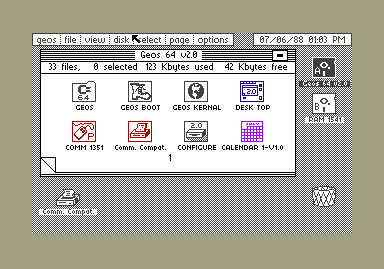
 I was looking at their UI and thinking about it, and you know what it reminds me of? This:
 That's GEOS on a Commodore 64, in about 1988. So, Metro is GEOS 2012. What do you guys think? Is it time to go back to monochrome? Sick of high color photo-quality icons and long for monochrome high-contrast user interfaces? Not me. But it seems all the cool UI designers are doing it. Mac OS X 10.7 LION is the least colorful version of Mac OS X yet, and it all seems to be fading into gray on silver on carbon, whether its the removal of color from the icons in the finder's quick-icon bar, or the complete disappearance of the scrollbar, the themes for this year's cool UI designers are "chromeless", "monochrome" and "minimalist".
Color me unimpressed.
That's GEOS on a Commodore 64, in about 1988. So, Metro is GEOS 2012. What do you guys think? Is it time to go back to monochrome? Sick of high color photo-quality icons and long for monochrome high-contrast user interfaces? Not me. But it seems all the cool UI designers are doing it. Mac OS X 10.7 LION is the least colorful version of Mac OS X yet, and it all seems to be fading into gray on silver on carbon, whether its the removal of color from the icons in the finder's quick-icon bar, or the complete disappearance of the scrollbar, the themes for this year's cool UI designers are "chromeless", "monochrome" and "minimalist".
Color me unimpressed.

Thursday, May 10, 2012
The world needs more Debug Tools
The world needs more debug tools. Well, Developers in this world do, anyways. Lately I've been learning Cocoa and ObjectiveC -- still the best way to write native iOS applications, if you don't mind the learning curve, and a lot more mature than Firemonkey is, yet -- and besides the beauty of the Cocoa frameworks and CocoaTouch (the iOS version of desktop Cocoa), one of the other things that is impressing me, is the tools that come with XCode, including "Instruments".
For a quick tour, read this link for an example of some of the things that you can do with it. Since reference counting is used everywhere in ObjectiveC, you need to know about things like retain cycles, for instance. Memory leaks in Delphi applications are more often because the "owner" didn't free an object when the owner was destroyed or no longer needed the object, although of course, reference counting does happen wherever you've got Interfaced objects. AQTime is the closest tool to Instruments, if you want to compare. But most Delphi developers don't own the full AQTime product, and Instruments comes with XCode. In fact, perhaps the most amazing thing about XCode is that it's free. Why is it free? Because Apple wants people to make iOS apps and Mac apps, and because until they took over making their own SDK, one of the big barriers to development on Apple devices, a long long time ago, was buying MetroWerks CodeWarrior, which was the Apple C/C++ IDE back in the bad-old-days prior to Mac OS X, and the iPhone, and every other cool thing.
Even though I have AQTime "Embarcadero Edition" that comes with XE2, and even though I've had AQTime Professional at various places where I've worked, I still feel that I don't have enough tools to find the difficult bugs.
I want a tool that will:
Help me step back in time to what happened right before the mess I'm in right now.
Slow down time but not stop it, giving me a way to run my code at not-exactly-full-speed, but at a usable enough speed, that I can operate the application, while seeing the mechanics of the app run, or fly by me on the screen.
Show a call stack, like a debugger, but also a call history, that goes back in time, until the beginning of each thread or a certain limit (say, 10000 entries per thread) is reached. Obviously the art here is knowing how much to hide and how much to show, and not only deleting the oldest entries, but also providing ways to creatively "fold" the history so that repetitive details that you don't care about could be ignored.
Log things without writing logging code. The current debugger can do this if you don't mind spending a lot of time doing the creation of breakpoints that don't break, but just log stuff. I also like to write logging via code, for production use, and I'm a big fan of CodeSite, or of just roll-your-own trace logging. But I want to profile code and trace its running,way beyond even what AQTime's function tracing can do. I think that AQTime is amazing, but I am sure more can be done. For example, I typed in FRED into an input box. I want to see the parts of the call tree, that have to do with the button I clicked, and the Edit box I typed fred into. I want to follow Fred, through my program. I want mouse clicks to initiate tracing just until I get back into the TApplication process-message-loop.
Like many things, I know I'll have to write it myself if I want it done right. The thing I don't know is how to start it. If I had the starter-codebase for a simple Application Profiler written in Delphi, I am sure I could extend it and try some of my ideas. Anybody know how to write a profiler for Delphi?
Update: Visual Studio people have something called Debugger Canvas. If you have Visual Studio 2010 ULTIMATE edition, check this free add-on out. And even if you don't do Visual Studio you should watch this video.
For a quick tour, read this link for an example of some of the things that you can do with it. Since reference counting is used everywhere in ObjectiveC, you need to know about things like retain cycles, for instance. Memory leaks in Delphi applications are more often because the "owner" didn't free an object when the owner was destroyed or no longer needed the object, although of course, reference counting does happen wherever you've got Interfaced objects. AQTime is the closest tool to Instruments, if you want to compare. But most Delphi developers don't own the full AQTime product, and Instruments comes with XCode. In fact, perhaps the most amazing thing about XCode is that it's free. Why is it free? Because Apple wants people to make iOS apps and Mac apps, and because until they took over making their own SDK, one of the big barriers to development on Apple devices, a long long time ago, was buying MetroWerks CodeWarrior, which was the Apple C/C++ IDE back in the bad-old-days prior to Mac OS X, and the iPhone, and every other cool thing.
Even though I have AQTime "Embarcadero Edition" that comes with XE2, and even though I've had AQTime Professional at various places where I've worked, I still feel that I don't have enough tools to find the difficult bugs.
I want a tool that will:
Like many things, I know I'll have to write it myself if I want it done right. The thing I don't know is how to start it. If I had the starter-codebase for a simple Application Profiler written in Delphi, I am sure I could extend it and try some of my ideas. Anybody know how to write a profiler for Delphi?
Update: Visual Studio people have something called Debugger Canvas. If you have Visual Studio 2010 ULTIMATE edition, check this free add-on out. And even if you don't do Visual Studio you should watch this video.
Tuesday, April 17, 2012
Software Development Culture: Art and Science
I have now been a professional software developer for 25 years. My first software development job was only part-time software development. I wrote and improved an application written using dBase III for DOS, at a surplus-electronics and surplus-military-gear (think parachutes, and backpacks, and camping gear, not weapons) store in my hometown. As an aside, it was the coolest job I've ever had, in addition to being the most poorly paid.
As a software job it lacked most of what professionals would consider "minimum standards" these days; The product had to be functional at all times, and there was no such thing as "release management". We were working on a live production system, at all times. The version control system was called "making a backup", and involved keeping around enough backup copies of the database image, on floppy disk, which included both the data and the code. There were no code reviews, there were no unit tests, there was no bug tracking database, and there were no development team meetings. For simpler single developer projects in a small non-networked application for DOS, it worked fine. But what happened between 1984 and 1994 is that the software development world fell apart, over and over again, and each time, something new was supposed to save it. Object oriented programming will save us. Blobbygrams (OOA/OOD) will save us. Metaprogramming will save us. Patterns will save us. Formal methodologies will save us. Each of these software tools has its place, or had a place at some time, but nothing has ever been a panacea.

Figure 1: dBase for DOS: Documentation and installation floppy disks
Why do we have so much procedure and process now, and so many tools that we never needed or didn't know we needed, back in the 1980s? Because we can't just fly by the seat of our pants. At a certain level of complexity, ad hoc approaches stop working at all, and lead to almost certain project failure.
Software projects often fail, even when there is a formal process, and the reason we most often pinpoint is that projects are "out of control", and that even though many or most people on the project know that the process is out of control, they can't agree on how to bring it back under control.
I love version control systems, because they are time-machines for code. And they are a part of keeping a software process under control, and knowing what code went to what customer, in what version of your project. And they're great. You should never work without one. One of the other things that version control was supposed to do was prevent things from changing that we want to keep frozen. Some version control systems even require you to "check out files" before you can work on them, and that "check out" action changes the files from "read only" to editable. (Visual Source Safe, and Perforce, are the two most commonly encountered version control systems that require you to first get a read only copy of the whole file set, then execute a "check out" command to make the individual source files writable before you can edit a file.) Part of the reason for that "read only" flag was that in the early days version control systems lacked real merge capabilities, or that merging was difficult, perhaps considered "risky" or "scary". Most projects that I have worked on, try to achieve such a "frozen" state or 'stable branch' for all major projects. Stability is part of a project being under control.
The other half of a project being under control, paradoxically, seems to be that everybody wants to keep cramming features into the product. This schizophrenia (stable, yet with new features) seems to be the proximal cause of projects going out of control, in my experience. Rapid uncontrolled progress on a project leads to one kind of diagnosis of project failure (it's unstable, and unusable) and yet, that rarely happens anymore at most places, projects are seen to be out of control for the reverse reason; Nobody can explain or justify how slow the progress on new features is going.
The most successful software projects I have ever worked on, and all of my favorite jobs, have had one thing in common; the projects that I worked on were "under control", that is, bad stuff was minimized, but also, expectations of developer productivity were reasonably in sync with what was realistically possible.
My best-ever bosses have all been people who knew what a PID loop was, and most of them could even tune one if they were asked to. A PID loop has at least one sensor-input that reads something from the real world, like temperature, or RPM, or air pressure, or perhaps a virtual input such as a price of a stock on the NYSE. It then has an output, which is something which can hopefully be used to affect the thing we're trying to control. If the input was a temperature sensor, measuring the temperature of a liquid, the output might be a relay on/off control attached to a heater, or it might be a variable output controlling a valve, which can change the pressure or flow of a gas or liquid, or perhaps the output might be the commands to a stock-market-buying-and-selling system. What a PID loop does is take three coefficient terms in an equation, a Proportional term, an Integral Term, and a Derivative term, and use those coefficients to do realtime control of a process. When a process is "under control" it behaves in a predictable way, even when it's disturbed. If the sun came in the window, and heated up the liquid that we're trying to control, a PID controller would handle that disturbance, if tuned properly and the process would not be out of control.
Software processes are not as simple to control as "one single input", but they do respond to logical analysis, and this logical analysis is conducted at a glacial pace. Once or twice within 20 years, someone comes up with something like the "SDLC" or "Waterfall" or "Scrum" or "Agile" approach to software development. These are promoted as a software panacea. Inevitably, certifications and formal processes take over informal insights into project management, and turn whatever good ideas were at the core of these software development "control" practices, and take all the effectiveness, and certainly, all of the fun, out of being a software professional. It's particularly sad to see "Agile" and "Scrum" get twisted, since the original ideal behind "Scrum" was exactly the insight that software processes are not universally equal and that practices that work in one context might not be workable in other contexts. So, while "Scrum" should have been resistant to such perverse misuse, It has been widely noted that what killed Waterfall could kill Agile, and scrum.
So given all that, you'd think that I would argue that developer should just be left alone to do what they do, and take as long as they're going to take, and all that. That would be a spoiled, unreasonable, and ultimately self-destructive viewpoint. The best projects I have worked with, and the best managers I have ever worked for, did not give developers enough autonomy that they could derail a business plan, and imperil a company's future. That would have been rediculous. But what they did do, was figure out what sorts of controls, and measurements of the software process were effective, and apply at least those methods and measurements that could be shown to be useful. They were agile without using the word agile. They didn't have code reviews. They didn't have scrums. But they had something which is perhaps the foundational principle behind Scrum:
Managers, stakeholders, and developers, co-operated, and worked together. Developers were respected, but not allowed to run the show. Managers were technically competent, and understood business requirements, and could ascertain whether or not developers were effective, and were making sufficient headway. Nobody got together for daily standup meetings and said "I'm blocked" or "No blockers", as if that would help. But when a developer needed a tool, he would go to his boss, and he'd get questions, intelligent ones about whether it was needed or not, and if the need seemed real, he would get his tool bought. When a developer was not making good progress, the approach was to see what could be done, pragmatically, to get something done, at a reasonable time, even if it wasn't the full spec that everybody would have dreamed off. That kind of rational change of scope, and attempt to protect project milestones, was as effective (whether we call it timeboxing, or sprints, or milestones) as it could have been, given that what really often held us back, and delayed projects, was the same thing that always delays projects; Inexact, incomplete, incoherent, mutually contradictory or vague requirements, due to a lack of real understanding of the underlying business requirements, or a misunderstanding about the real useful nature of the software product.
Pragmatism should be the primary value in every development organization,and on every project. Pragmatism stays focused on business. The business of writing software. It doesn't go down blind alleys, it doesn't play blame games, and it doesn't wonder about water that's gone under the bridge, but it sticks to the question; What do we do now, what do we do next, and how do we prevent issues that have affected our ability to do great work from hurting us all again? Pragmatism takes collective responsibility for success, and doesn't blame individuals. It doesn't play political games, and it doesn't stab people in the back. Pragmatic professional software development is not a buzzword, or an approach that replaces human judgement. In fact it relies on human judgement, and only works when you're sane, sensible, and centered in reality. It's just recognizing that there's a lot of superstition and magical thinking out there in the software development world, that needs to be replaced with careful, rational, friendly, collegial, scientific realism.
As a software job it lacked most of what professionals would consider "minimum standards" these days; The product had to be functional at all times, and there was no such thing as "release management". We were working on a live production system, at all times. The version control system was called "making a backup", and involved keeping around enough backup copies of the database image, on floppy disk, which included both the data and the code. There were no code reviews, there were no unit tests, there was no bug tracking database, and there were no development team meetings. For simpler single developer projects in a small non-networked application for DOS, it worked fine. But what happened between 1984 and 1994 is that the software development world fell apart, over and over again, and each time, something new was supposed to save it. Object oriented programming will save us. Blobbygrams (OOA/OOD) will save us. Metaprogramming will save us. Patterns will save us. Formal methodologies will save us. Each of these software tools has its place, or had a place at some time, but nothing has ever been a panacea.

Why do we have so much procedure and process now, and so many tools that we never needed or didn't know we needed, back in the 1980s? Because we can't just fly by the seat of our pants. At a certain level of complexity, ad hoc approaches stop working at all, and lead to almost certain project failure.
Software projects often fail, even when there is a formal process, and the reason we most often pinpoint is that projects are "out of control", and that even though many or most people on the project know that the process is out of control, they can't agree on how to bring it back under control.
I love version control systems, because they are time-machines for code. And they are a part of keeping a software process under control, and knowing what code went to what customer, in what version of your project. And they're great. You should never work without one. One of the other things that version control was supposed to do was prevent things from changing that we want to keep frozen. Some version control systems even require you to "check out files" before you can work on them, and that "check out" action changes the files from "read only" to editable. (Visual Source Safe, and Perforce, are the two most commonly encountered version control systems that require you to first get a read only copy of the whole file set, then execute a "check out" command to make the individual source files writable before you can edit a file.) Part of the reason for that "read only" flag was that in the early days version control systems lacked real merge capabilities, or that merging was difficult, perhaps considered "risky" or "scary". Most projects that I have worked on, try to achieve such a "frozen" state or 'stable branch' for all major projects. Stability is part of a project being under control.
The other half of a project being under control, paradoxically, seems to be that everybody wants to keep cramming features into the product. This schizophrenia (stable, yet with new features) seems to be the proximal cause of projects going out of control, in my experience. Rapid uncontrolled progress on a project leads to one kind of diagnosis of project failure (it's unstable, and unusable) and yet, that rarely happens anymore at most places, projects are seen to be out of control for the reverse reason; Nobody can explain or justify how slow the progress on new features is going.
The most successful software projects I have ever worked on, and all of my favorite jobs, have had one thing in common; the projects that I worked on were "under control", that is, bad stuff was minimized, but also, expectations of developer productivity were reasonably in sync with what was realistically possible.
My best-ever bosses have all been people who knew what a PID loop was, and most of them could even tune one if they were asked to. A PID loop has at least one sensor-input that reads something from the real world, like temperature, or RPM, or air pressure, or perhaps a virtual input such as a price of a stock on the NYSE. It then has an output, which is something which can hopefully be used to affect the thing we're trying to control. If the input was a temperature sensor, measuring the temperature of a liquid, the output might be a relay on/off control attached to a heater, or it might be a variable output controlling a valve, which can change the pressure or flow of a gas or liquid, or perhaps the output might be the commands to a stock-market-buying-and-selling system. What a PID loop does is take three coefficient terms in an equation, a Proportional term, an Integral Term, and a Derivative term, and use those coefficients to do realtime control of a process. When a process is "under control" it behaves in a predictable way, even when it's disturbed. If the sun came in the window, and heated up the liquid that we're trying to control, a PID controller would handle that disturbance, if tuned properly and the process would not be out of control.
Software processes are not as simple to control as "one single input", but they do respond to logical analysis, and this logical analysis is conducted at a glacial pace. Once or twice within 20 years, someone comes up with something like the "SDLC" or "Waterfall" or "Scrum" or "Agile" approach to software development. These are promoted as a software panacea. Inevitably, certifications and formal processes take over informal insights into project management, and turn whatever good ideas were at the core of these software development "control" practices, and take all the effectiveness, and certainly, all of the fun, out of being a software professional. It's particularly sad to see "Agile" and "Scrum" get twisted, since the original ideal behind "Scrum" was exactly the insight that software processes are not universally equal and that practices that work in one context might not be workable in other contexts. So, while "Scrum" should have been resistant to such perverse misuse, It has been widely noted that what killed Waterfall could kill Agile, and scrum.
So given all that, you'd think that I would argue that developer should just be left alone to do what they do, and take as long as they're going to take, and all that. That would be a spoiled, unreasonable, and ultimately self-destructive viewpoint. The best projects I have worked with, and the best managers I have ever worked for, did not give developers enough autonomy that they could derail a business plan, and imperil a company's future. That would have been rediculous. But what they did do, was figure out what sorts of controls, and measurements of the software process were effective, and apply at least those methods and measurements that could be shown to be useful. They were agile without using the word agile. They didn't have code reviews. They didn't have scrums. But they had something which is perhaps the foundational principle behind Scrum:
Managers, stakeholders, and developers, co-operated, and worked together. Developers were respected, but not allowed to run the show. Managers were technically competent, and understood business requirements, and could ascertain whether or not developers were effective, and were making sufficient headway. Nobody got together for daily standup meetings and said "I'm blocked" or "No blockers", as if that would help. But when a developer needed a tool, he would go to his boss, and he'd get questions, intelligent ones about whether it was needed or not, and if the need seemed real, he would get his tool bought. When a developer was not making good progress, the approach was to see what could be done, pragmatically, to get something done, at a reasonable time, even if it wasn't the full spec that everybody would have dreamed off. That kind of rational change of scope, and attempt to protect project milestones, was as effective (whether we call it timeboxing, or sprints, or milestones) as it could have been, given that what really often held us back, and delayed projects, was the same thing that always delays projects; Inexact, incomplete, incoherent, mutually contradictory or vague requirements, due to a lack of real understanding of the underlying business requirements, or a misunderstanding about the real useful nature of the software product.
Pragmatism should be the primary value in every development organization,and on every project. Pragmatism stays focused on business. The business of writing software. It doesn't go down blind alleys, it doesn't play blame games, and it doesn't wonder about water that's gone under the bridge, but it sticks to the question; What do we do now, what do we do next, and how do we prevent issues that have affected our ability to do great work from hurting us all again? Pragmatism takes collective responsibility for success, and doesn't blame individuals. It doesn't play political games, and it doesn't stab people in the back. Pragmatic professional software development is not a buzzword, or an approach that replaces human judgement. In fact it relies on human judgement, and only works when you're sane, sensible, and centered in reality. It's just recognizing that there's a lot of superstition and magical thinking out there in the software development world, that needs to be replaced with careful, rational, friendly, collegial, scientific realism.
Tuesday, April 10, 2012
Jack Tramiel


Sunday, April 8, 2012
Delphi and OS/2
The year that Delphi 1.0 was released, my main desktop computer at home, and my computer at work, were both running IBM OS/2 Warp, an operating system that is now 25 years old.
I was employed in 1995 to write software for a large insurance company that had invested heavily in IBM OS/2 Warp, using Visual Age C++, a now dead compiler, IDE and tool set. We wrote scripts and tools in a language called Rexx.
Rexx was a language that was intended to become what Python, Perl, and Ruby later became; Very expressive, dynamic high level languages, but Rexx was not concerned with doing so in any kind of object-oriented way.
OS/2 had a lot of interesting aspects. The desktop environment had a system-level object model much like the Microsoft COM (OLE Automation) model, and it was called the System Object Model (SOM). The desktop was entirely composed of persistent objects which made them much more interesting than the desktop-icon-shortcuts on your windows desktop.
Microsoft is often accused of merely buying technology rather than building it from scratch, since DOS, their first big product other than the ROM-basic that came in early 8-bit computers, was actually acquired from a company called Seattle Computer Products. OS/2 on the other hand, was mostly a home-grown project, jointly developed in its earliest days, by both Microsoft and IBM. An early disagreement about the graphical user interface (presentation manager, written by IBM, versus the Windows codebase and APIs, written of course by Microsoft) lead to a "divorce" between Microsoft and IBM, and IBM took over OS/2 development, and marketing, and subsequently (and rather famously) killed it completely.
Around the same time, IBM did a lot of other creative things, or rather, bought them from other people, and renamed them, and then failed to market them, and killed them completely. One of those clever things was Visual Age SMALLTALK, which is still alive as "VA Smalltalk" sold by Instantiations, Inc. Some of the original IBM smalltalk people (who came to IBM along with visual age itself) are still working on the product, which is an obscure but beautiful little thing. I played around with Smalltalk, but instead of using their lean fast "Rapid application development" I was building using the IBM VA C++ class libraries, which were (like many IBM products) good in theory, and rubbish in real world use. They had adapted a visual-programming system that actually involved "wiring up integrated-circuit-like components", in some really interesting precursor to "dependency injection" and modern OOP. The problem was, that the system was useless in practice. You couldn't use it to build anything more complicated than a HelloWorld demo without it turning into crap. The company I was working for folded up shop. The insurance company client kept its IBM OS/400 based solutions around for a few more years, until they were eventually scrapped, and they moved to a Windows based desktop like everybody else. At one point, the PC world was IBMs to lose, and now that they're insignificant players in the software market, and have exited the PC hardware market completely, I'm almost sad for them. Almost. Because they were so brilliant in some ways, and so inept in other ways. OS/2 was brilliant except when it made me want to tear my hair out, scream, rant, swear, and fuss. I was an OS/2 fan, except when I was an OS/2 hater. It was a pre-emptively multitasking protected mode operating system, and I ran a bulletin board system on it for years. It was a thing of beauty, in its time. A year ago I decided to get a VirtualBox VM working with OS/2 on it. Fun stuff. But I was reminded how very long ago it was. 16 color VGA at 640x480 was the default desktop screen resolution. No PPP or TCP/IP+DHCP out of the box in OS/2 Warp until 4.0. Not much support for any hardware not manufactured by IBM, any date after 1997. Sad really.
Once I learned to use Linux/Unix, and the BSDs, even OS/2's better-than-windows environment doesn't seem that useful or interesting to me. The architecture of a Linux system is far nicer to use, and so flexible and easily tailored, even without looking at any source code. And even the worst GCC and gnu stdlibc releases in all of history, were better and easier to use than the crap that came out of IBM.
So I'm nostalgic, but not really. It was good, but bits of it were rubbish. I enjoyed Rexx programming quite a bit, too, but Python is just so nice that I can't imagine writing scripts in anything like that ever again.
Delphi is still the one and only Visual RAD tool that I have ever found that was any good at all, and worth using. IBM Visual Age C++ and Visual Age Smalltalk are both dead and consigned to the scrap-heap of history, but they had this fascinating "building from parts" and "wiring up components" ideas that nothing, not even Delphi, has been able to equal for sheer coolness. Sad that coolness and proof-of-concepts were all it was really good for.
Subscribe to:
Posts (Atom)